
MiDorm
MiDorm
Dorm Decisions, made easy
Dorm Decisions, made easy
This was a team project, part of Advanced Design (SI 407) course at the University of Michigan
This was a team project, part of Advanced Design (SI 407) course at the University of Michigan
Why This Product
Why This Product
As an incoming freshman, choosing where to live can feel overwhelming. Information scattered and no easy way to compare dorms, students often rely on guesswork and word of mouth.
MiDorm simplifies this by organizing key information and creating an easy way to explore and compare options to help students make informed decisions.
As an incoming freshman, choosing where to live can feel overwhelming. Information scattered and no easy way to compare dorms, students often rely on guesswork and word of mouth.
MiDorm simplifies this by organizing key information and creating an easy way to explore and compare options to help students make informed decisions.
Phase 1:
Competitive Review
Phase 1:
Competitive Review
For each competitor, we examined the clarity of option presentation, the transparency of option information, and personalization.
For each competitor, we examined the clarity of option presentation, the transparency of option information, and personalization.
Key Findings
Key Findings
Cluttered Interfaces Make Dorm Selection Overwhelming
Students struggle to quickly identify dorms that meet their needs due to dense option presentation and limited visibility into dorm information.
Cluttered Interfaces Make Dorm Selection Overwhelming
Students struggle to quickly identify dorms that meet their needs due to dense option presentation and limited visibility into dorm information.
No Way to Track or Compare Preferred Dorms
Existing tools do not allow students to save or compare dorms they are considering. This causes students to rely on memory or external tools
No Way to Track or Compare Preferred Dorms
Existing tools do not allow students to save or compare dorms they are considering. This causes students to rely on memory or external tools
Phase 2:
Defining the Product
Phase 2:
Defining the Product
After conducting this user research, we compiled our findings into a Product Vision Board. This method allowed us to capture the overall app implementation strategy and ensure that our app leveraged the strengths of the University
After conducting this user research, we compiled our findings into a Product Vision Board. This method allowed us to capture the overall app implementation strategy and ensure that our app leveraged the strengths of the University
Target Group
Target Group
Incoming students @ University of Michigan
Incoming students @ University of Michigan
Design Goals
Design Goals
Providing detailed visual descriptions of dorms
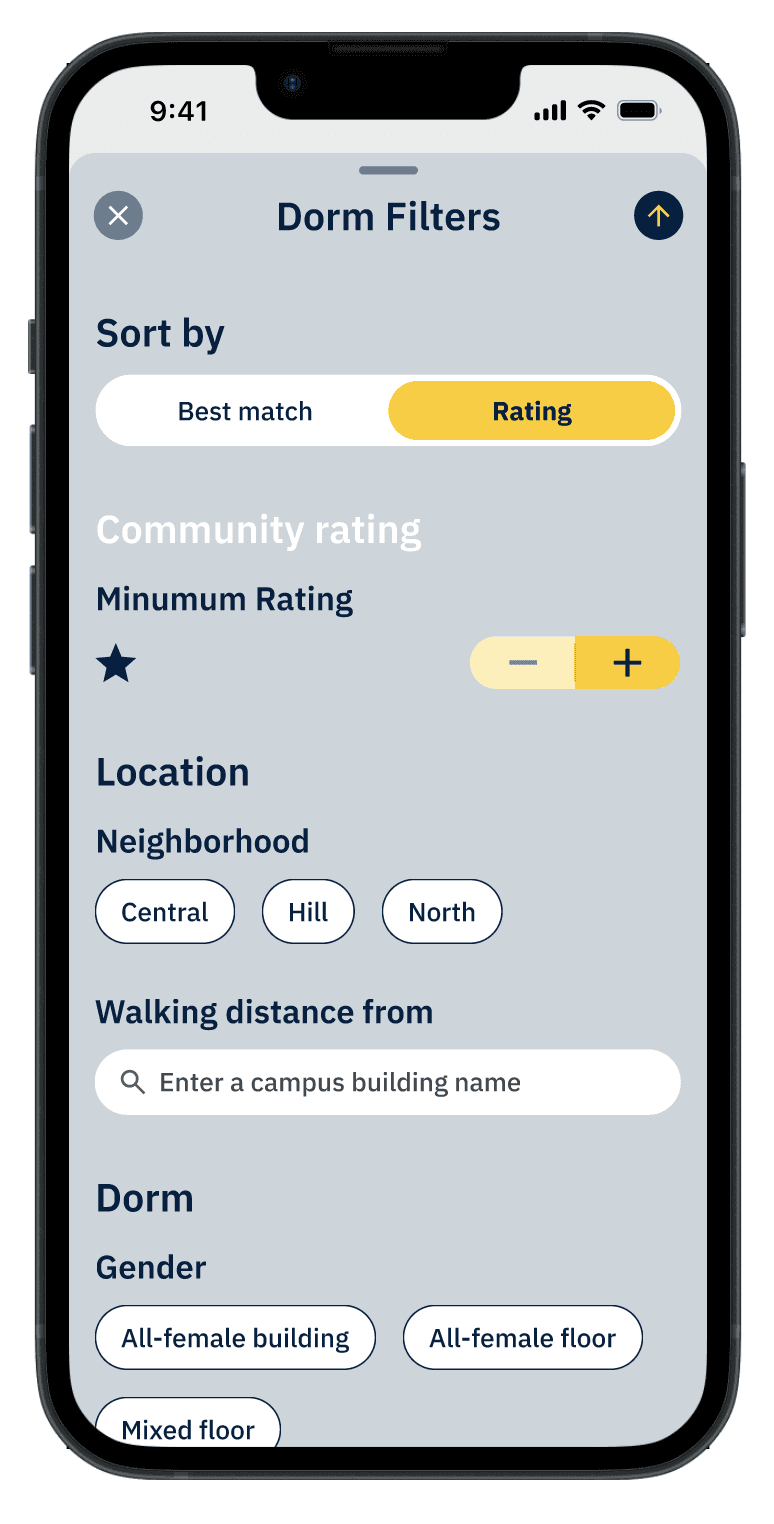
Personalized filtering/sorting options
Option to prioritize and rank dorms
Providing detailed visual descriptions of dorms
Personalized filtering/sorting options
Option to prioritize and rank dorms
Phase 3:
Design Process
Phase 3:
Design Process
Ideation Phase
Ideation Phase
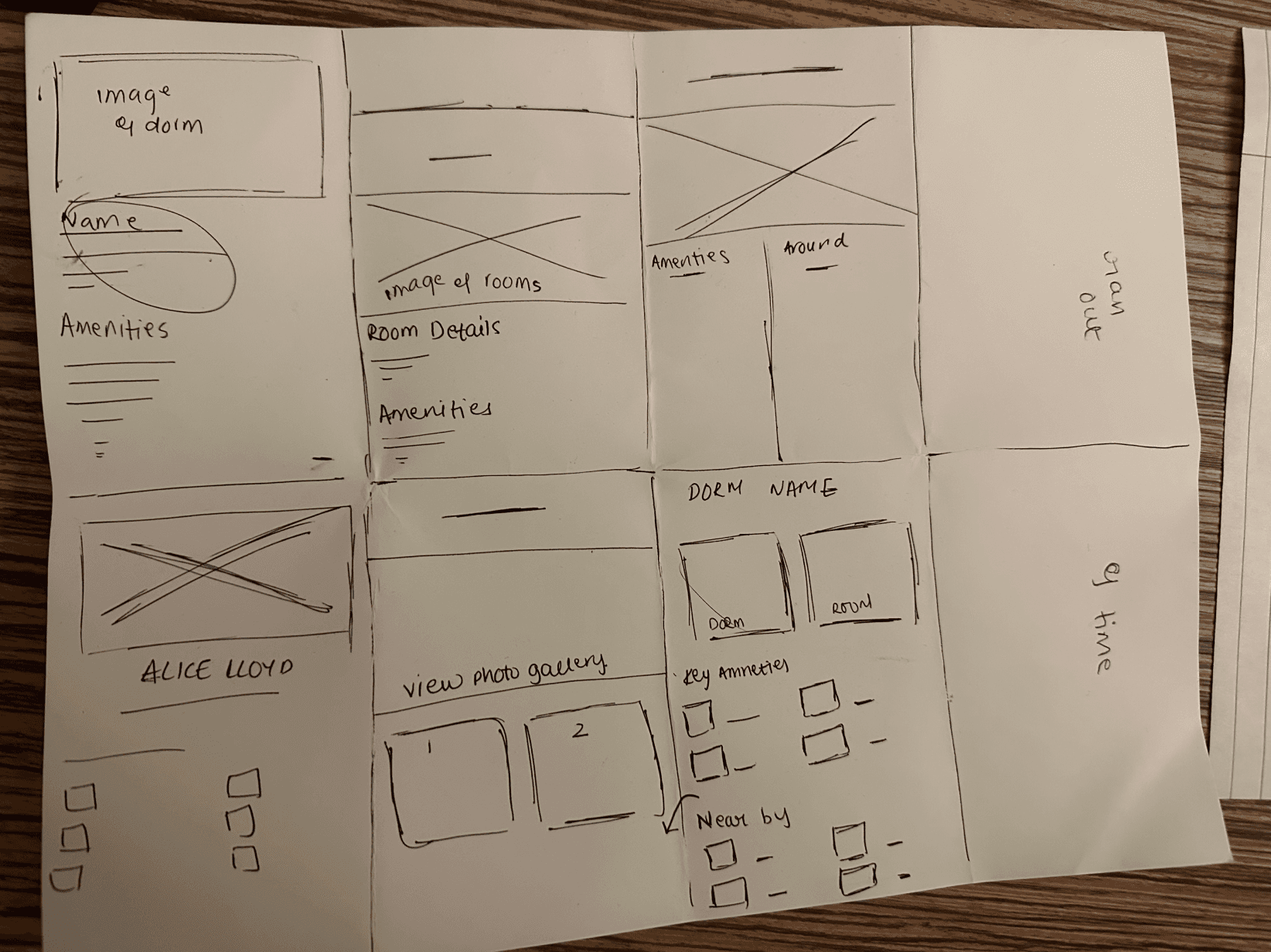
Crazy 8 sketches
Crazy 8 sketches
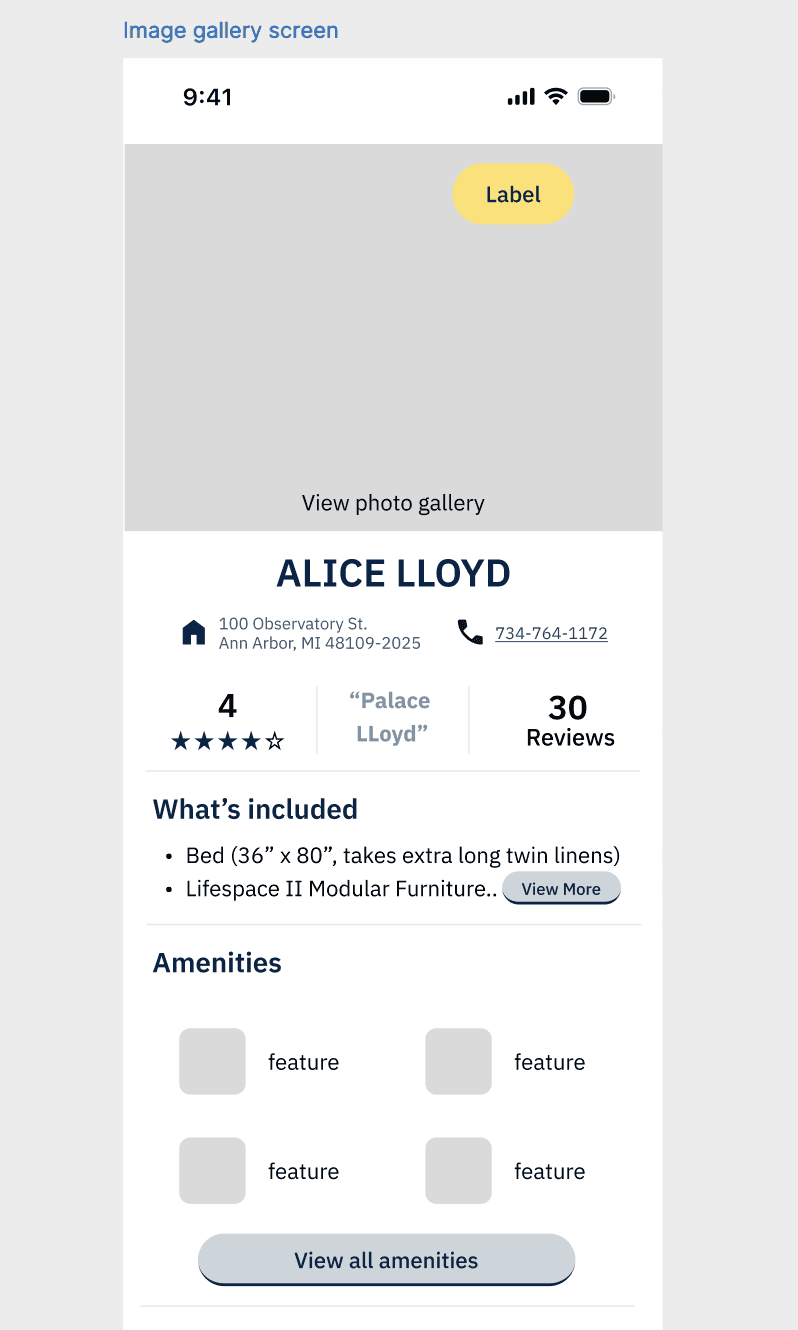
Mid-Fi
Mid-Fi
Key Design Decision
Key Design Decision
Visual details are the most engaging and useful to students. This led us to adopt a photo-first design for dorm detail screens.
Visual details are the most engaging and useful to students. This led us to adopt a photo-first design for dorm detail screens.
Mobile First + Design System
Mobile First + Design System
Before designing our high-fidelity designs, we created a design system to streamline our process. We used Apple’s iOS Human Interface Guidelines and library to create key components such as tab bars, toggles, and overlays/sheets, so the experience felt instantly intuitive for Apple users.
Before designing our high-fidelity designs, we created a design system to streamline our process. We used Apple’s iOS Human Interface Guidelines and library to create key components such as tab bars, toggles, and overlays/sheets, so the experience felt instantly intuitive for Apple users.
Phase 4:
Initial Hi-Fidelity
Phase 4:
Initial Hi-Fidelity
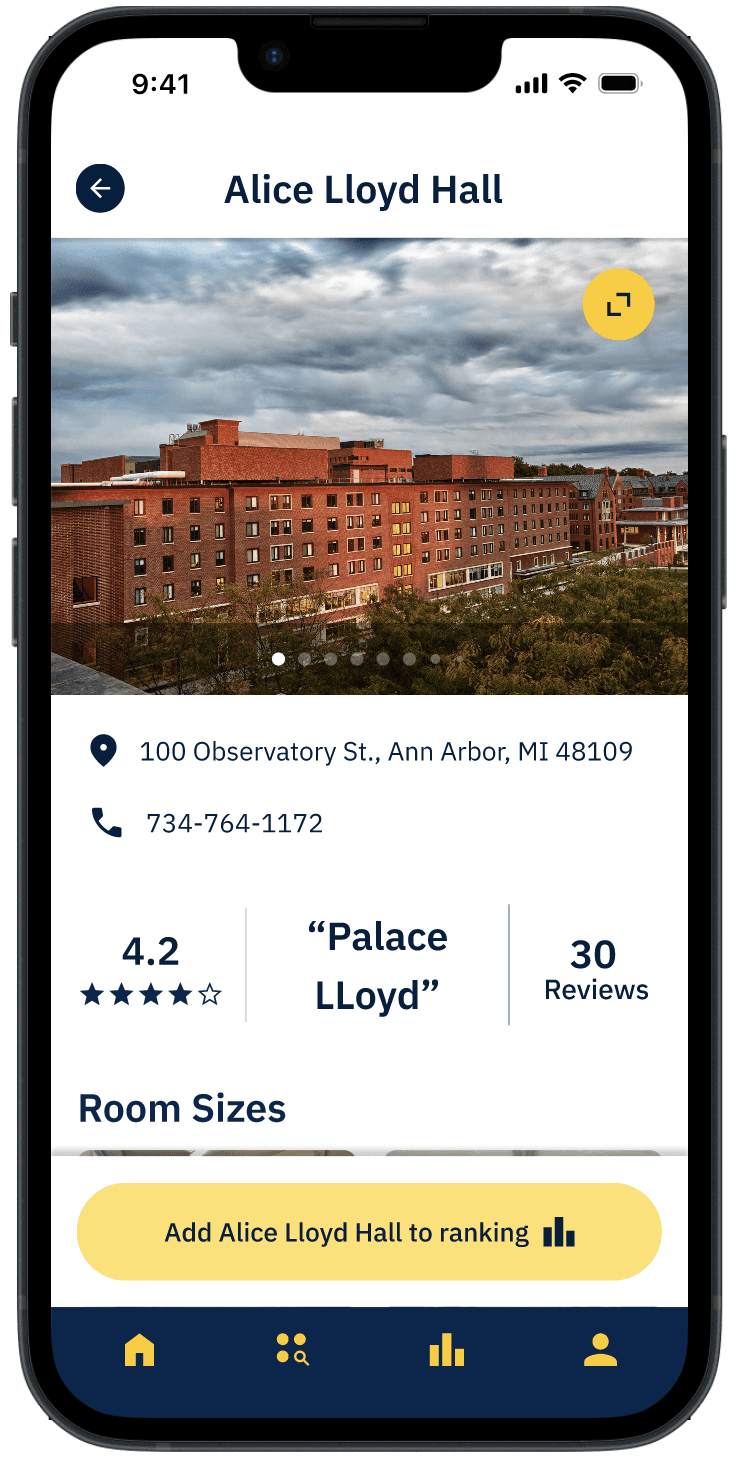
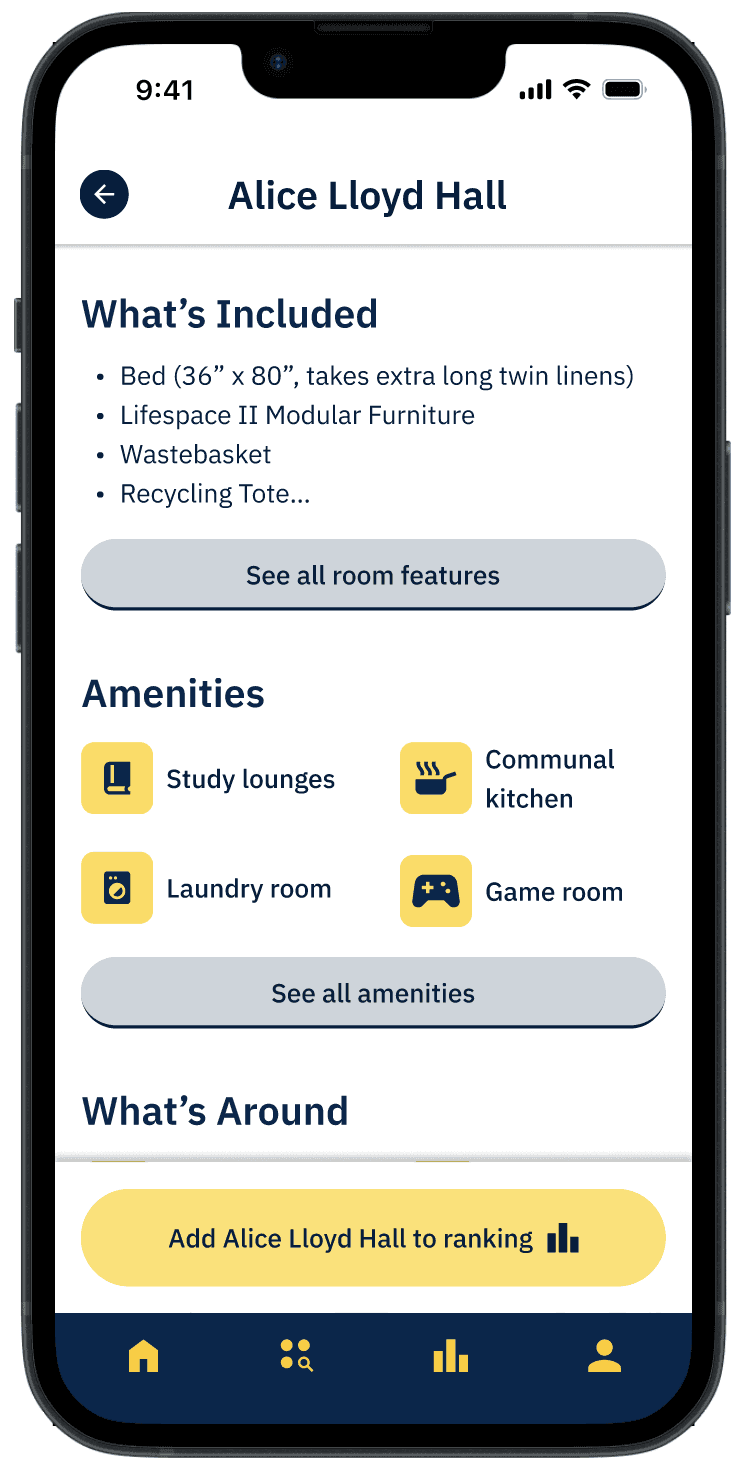
Keeping our research findings and mobile-first considerations in mind, we progressed our major app screens from sketches to high-fidelity prototyped wireframes.
Keeping our research findings and mobile-first considerations in mind, we progressed our major app screens from sketches to high-fidelity prototyped wireframes.
Keeping our research findings and mobile-first considerations in mind, we progressed our major app screens from sketches to high-fidelity prototyped wireframes.
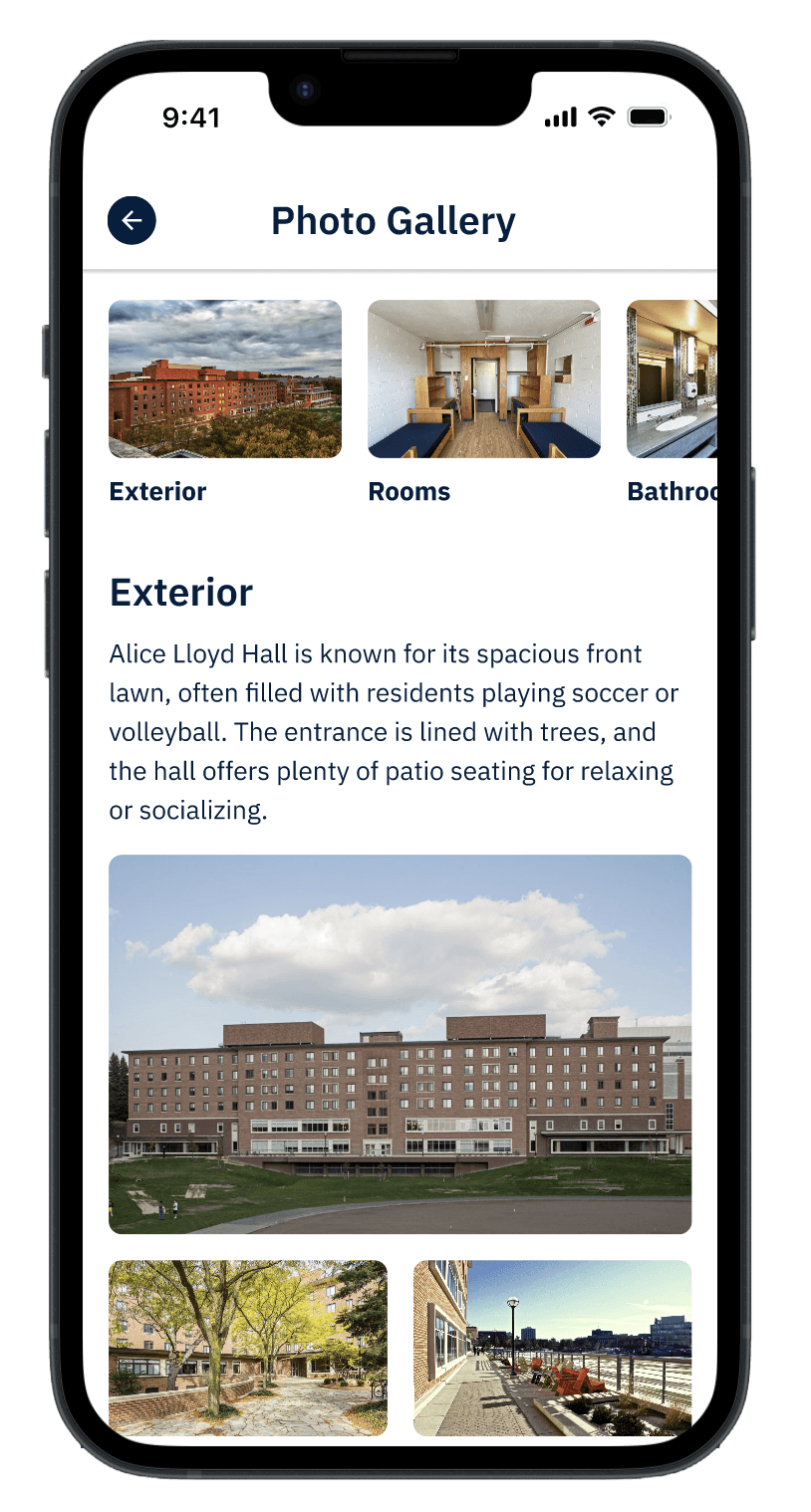
Product Detail Page
Product Detail Page
Key Design Decision- Photo Gallery (Product Detail Page)
Key Design Decision- Photo Gallery (Product Detail Page)
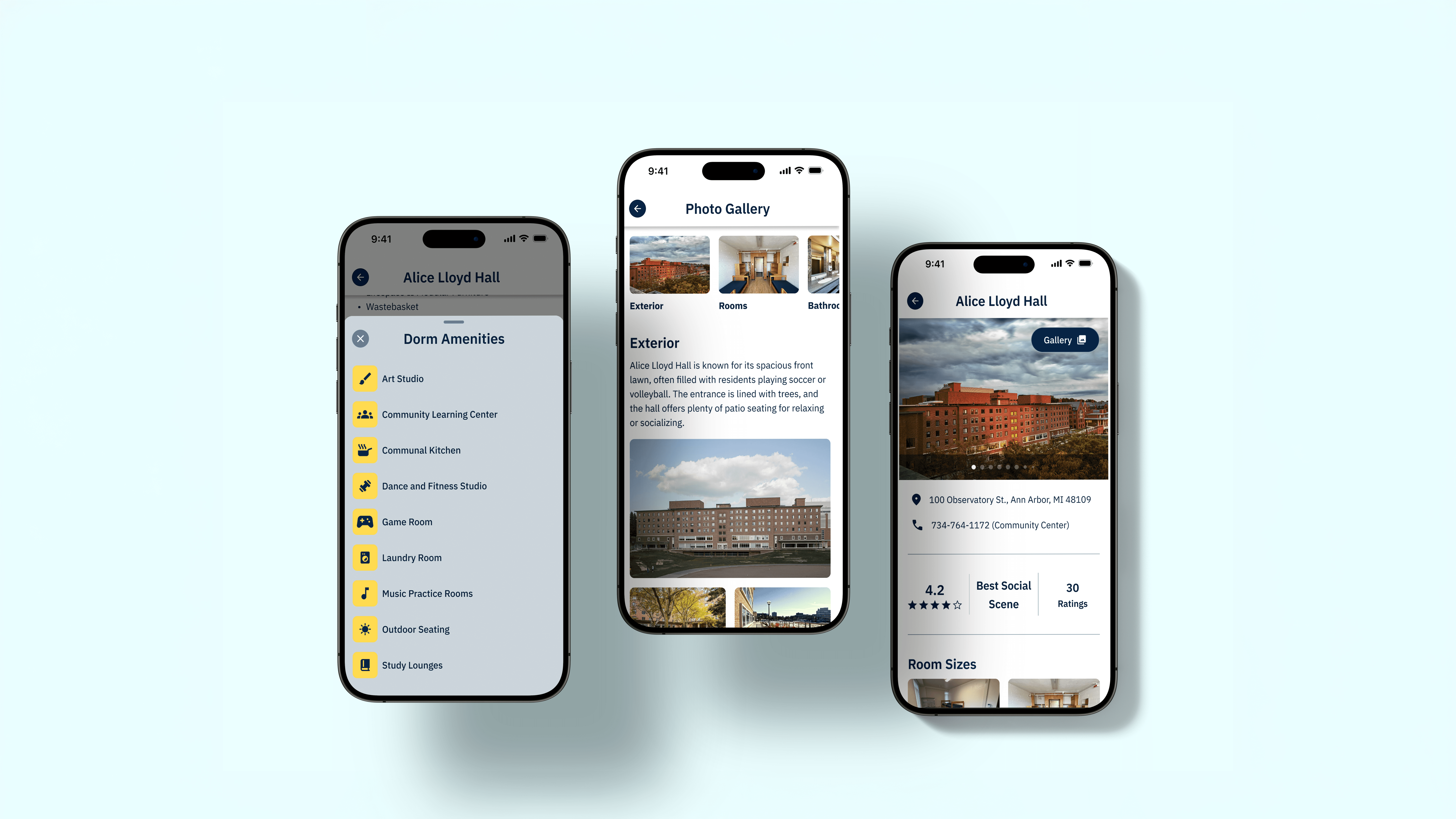
Increasing visual transparency by placing a photo gallery at the top of each dorm page, featuring student-submitted images of real rooms and spaces help students make more informed decisions.
Increasing visual transparency by placing a photo gallery at the top of each dorm page, featuring student-submitted images of real rooms and spaces help students make more informed decisions.
Phase 5:
User Testing Insights
Phase 5:
User Testing Insights
We conducted 5 moderated usability tests with current undergraduate U-M students who have lived in a campus dorm as it aligned with our target demographic.
Our main tasks tested included: using filters to identify dorms matching specific criteria, learning more about a specific dorm, and reorganizing a dorm ranking.
We conducted 5 moderated usability tests with current undergraduate U-M students who have lived in a campus dorm as it aligned with our target demographic.
Our main tasks tested included: using filters to identify dorms matching specific criteria, learning more about a specific dorm, and reorganizing a dorm ranking.
Keeping our research findings and mobile-first considerations in mind, we progressed our major app screens from sketches to high-fidelity prototyped wireframes.
Success
Success
We found that our design performed as intended. All five participants were able to complete the key tasks with ease and they appreciated the level of transparency and detail provided in the dorm information.
We found that our design performed as intended. All five participants were able to complete the key tasks with ease and they appreciated the level of transparency and detail provided in the dorm information.
" The filters are really easy to scroll through" - Diya Sankla ( Senior @ Umich)
" The filters are really easy to scroll through" - Diya Sankla ( Senior @ Umich)
" I really appreciated pictures of the dorms because I didn't have that when initially going through the process"- Reeva Bohra ( Junior @ Umich)
" I really appreciated pictures of the dorms because I didn't have that when initially going through the process"- Reeva Bohra ( Junior @ Umich)
Pain Points
Pain Points
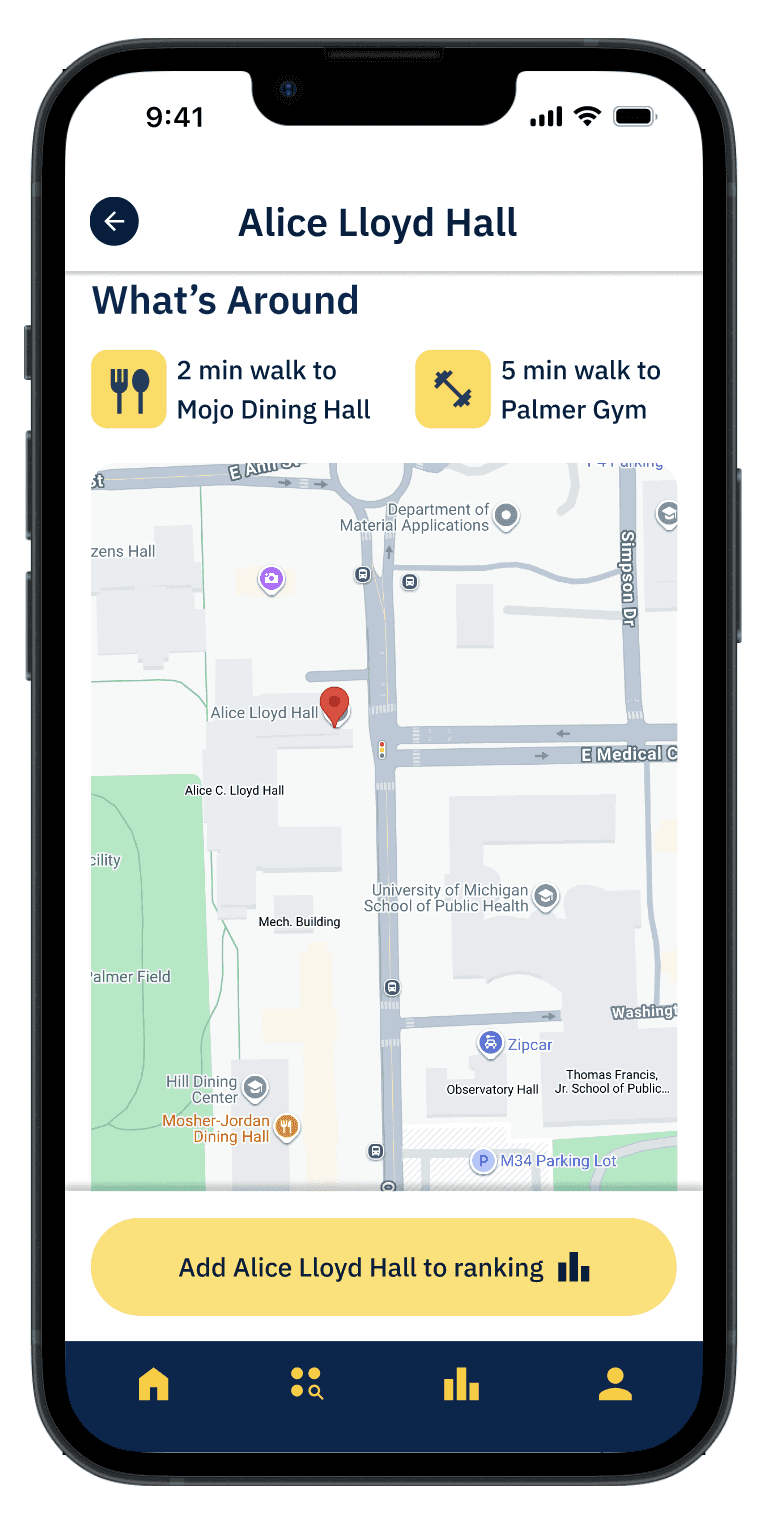
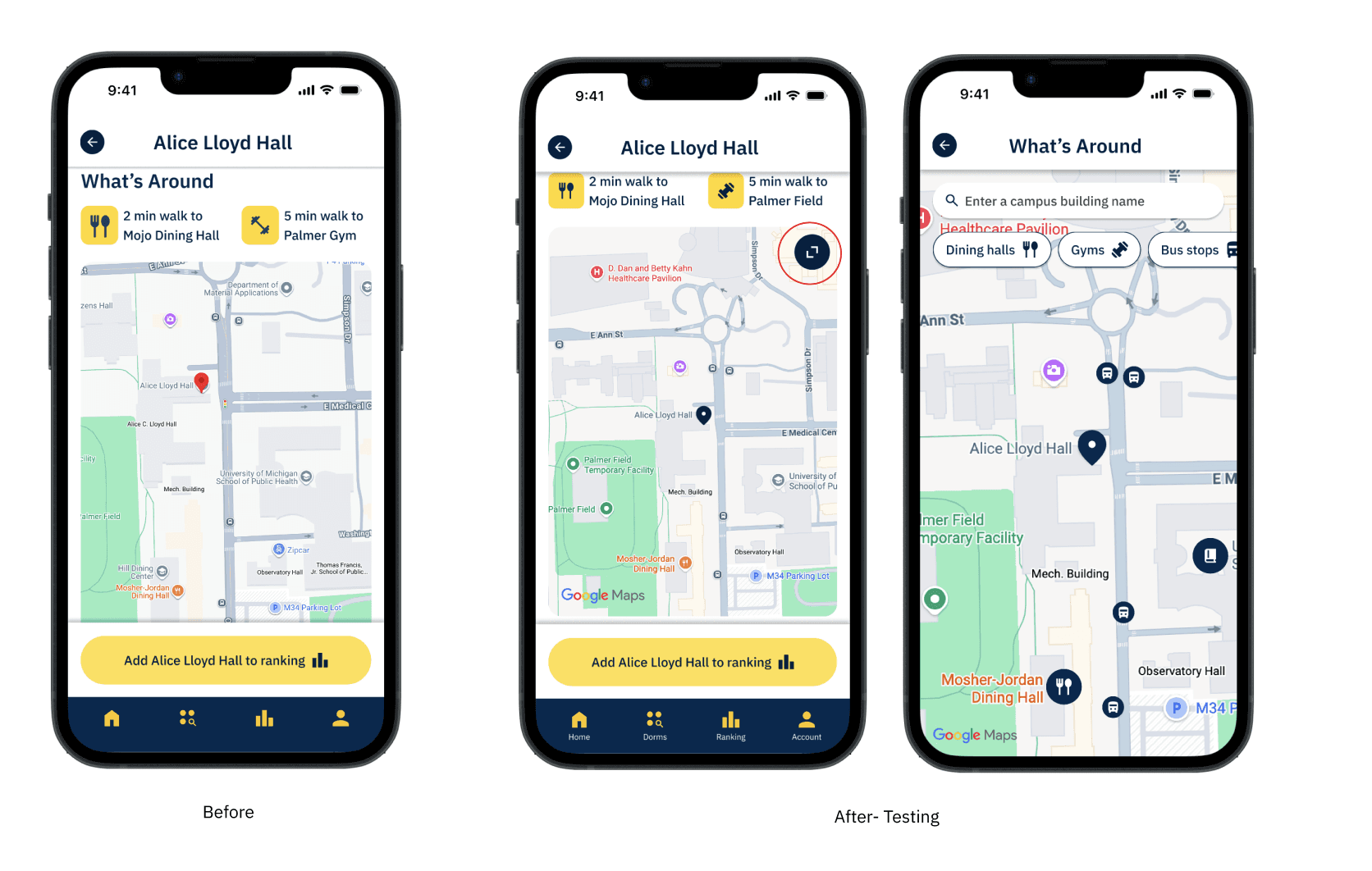
Users expected more interactive functionality from the dorm map on the dorm detail screen.
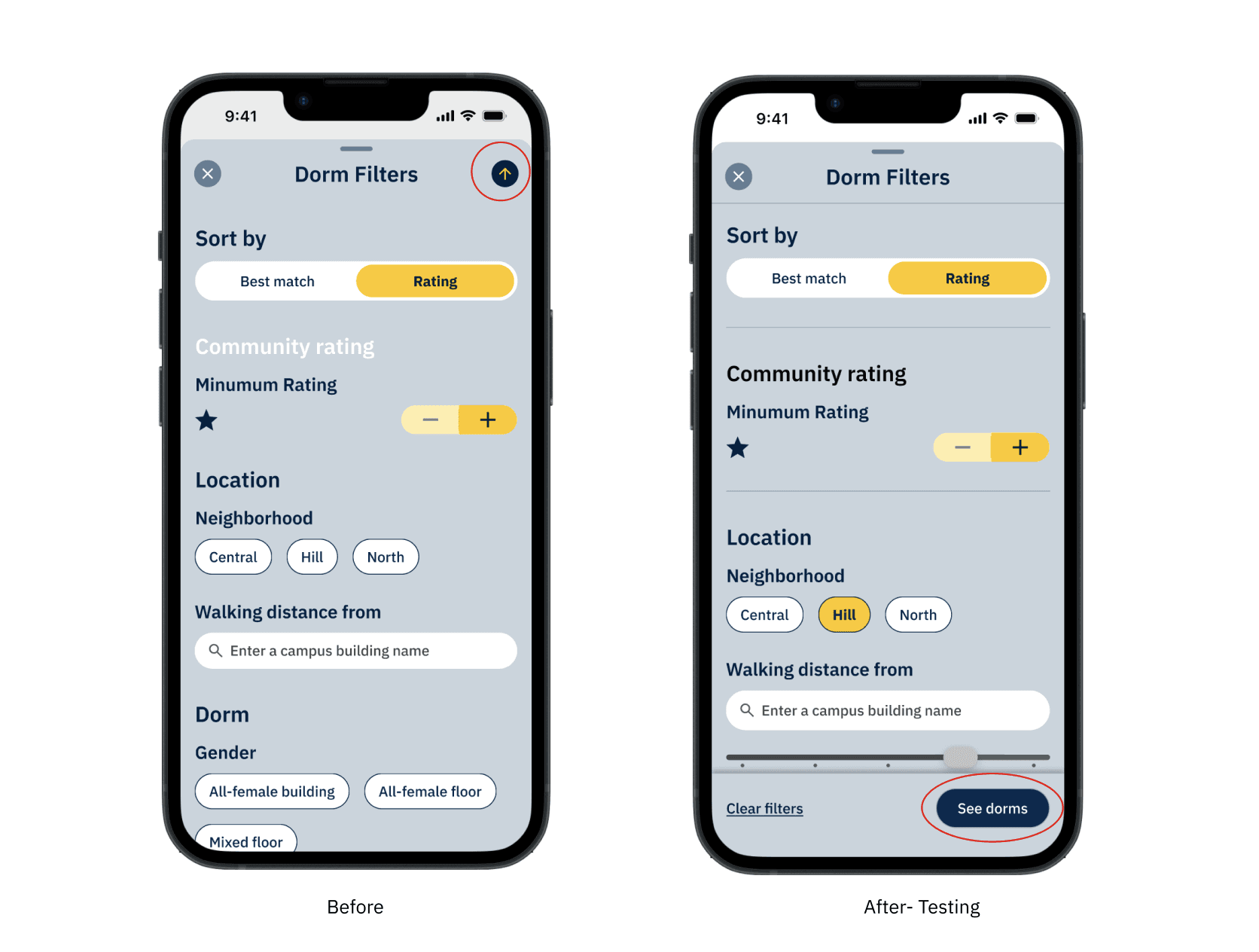
Three out of five participants expected a visible “Done” or “Search” button and did not recognize the iOS up-arrow as the action to apply filters.
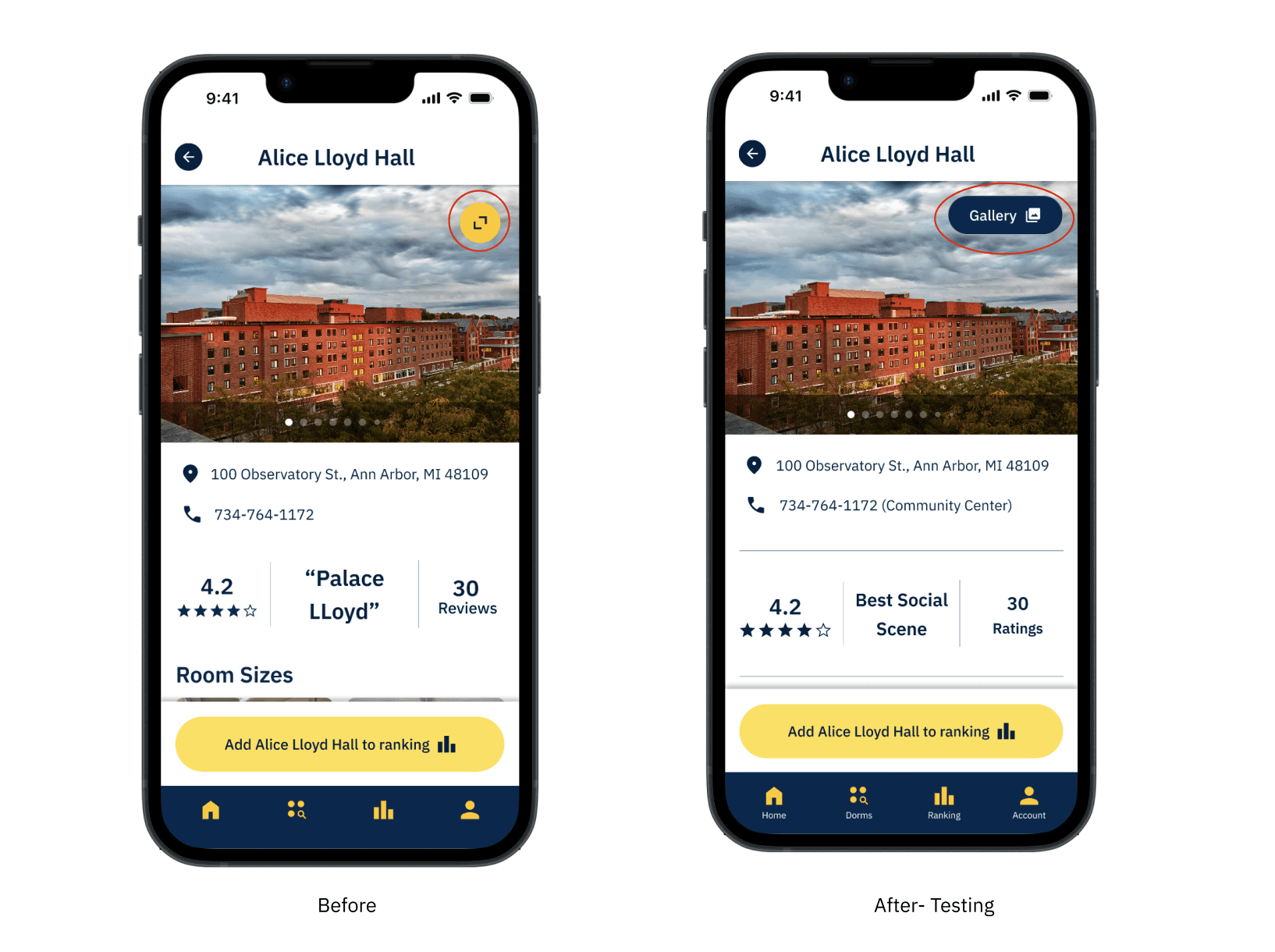
Users did not recognize the photo gallery as interactive and were unaware they could tap to view more images.
Users expected more interactive functionality from the dorm map on the dorm detail screen.
Three out of five participants expected a visible “Done” or “Search” button and did not recognize the iOS up-arrow as the action to apply filters.
Users did not recognize the photo gallery as interactive and were unaware they could tap to view more images.
Revision
Revision
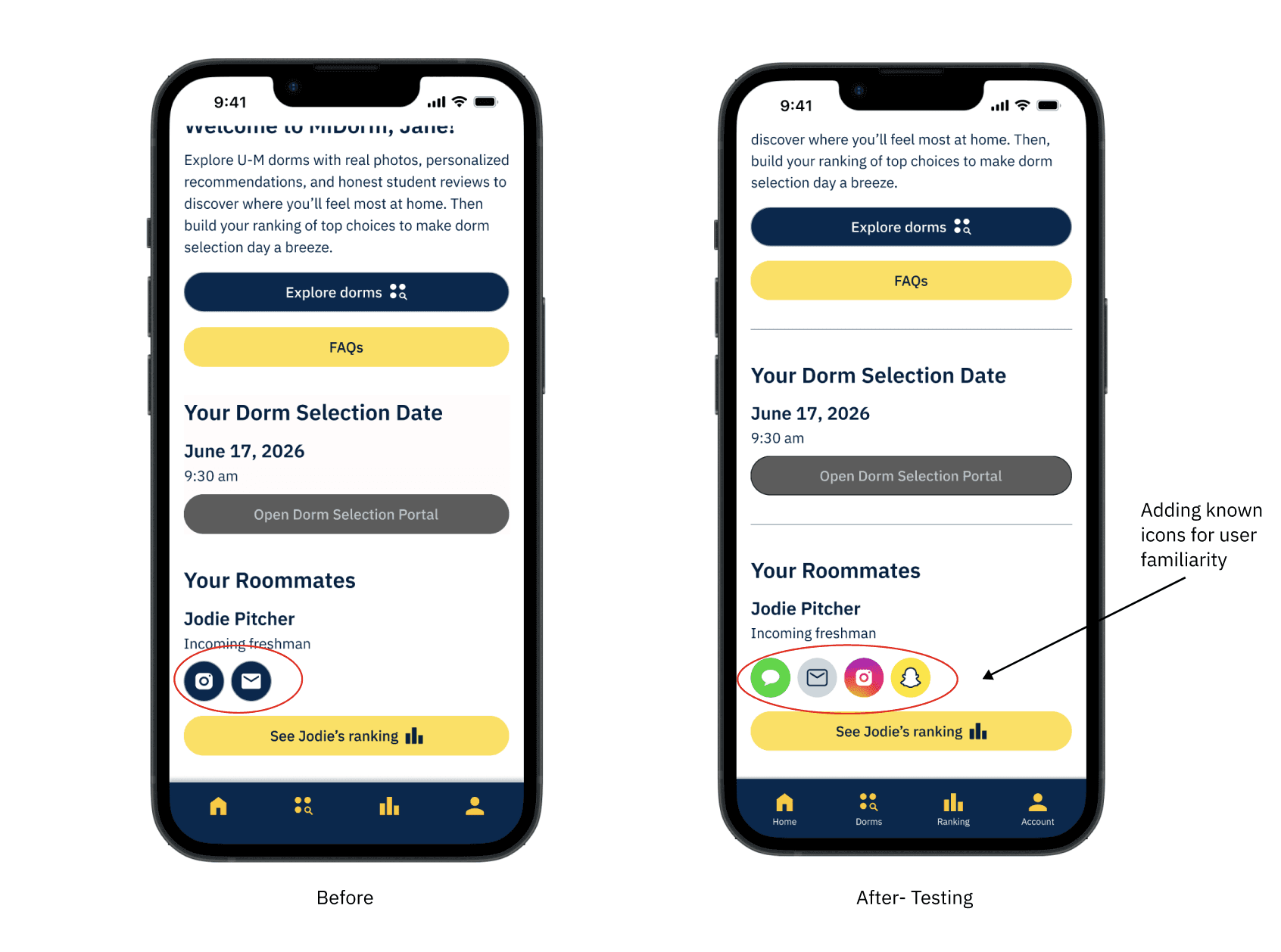
Diverse preferences for contacting roommates outside of in-app messaging → Allowed users to share multiple third-party contact methods (email, phone number, Instagram, etc.) with their roommate.
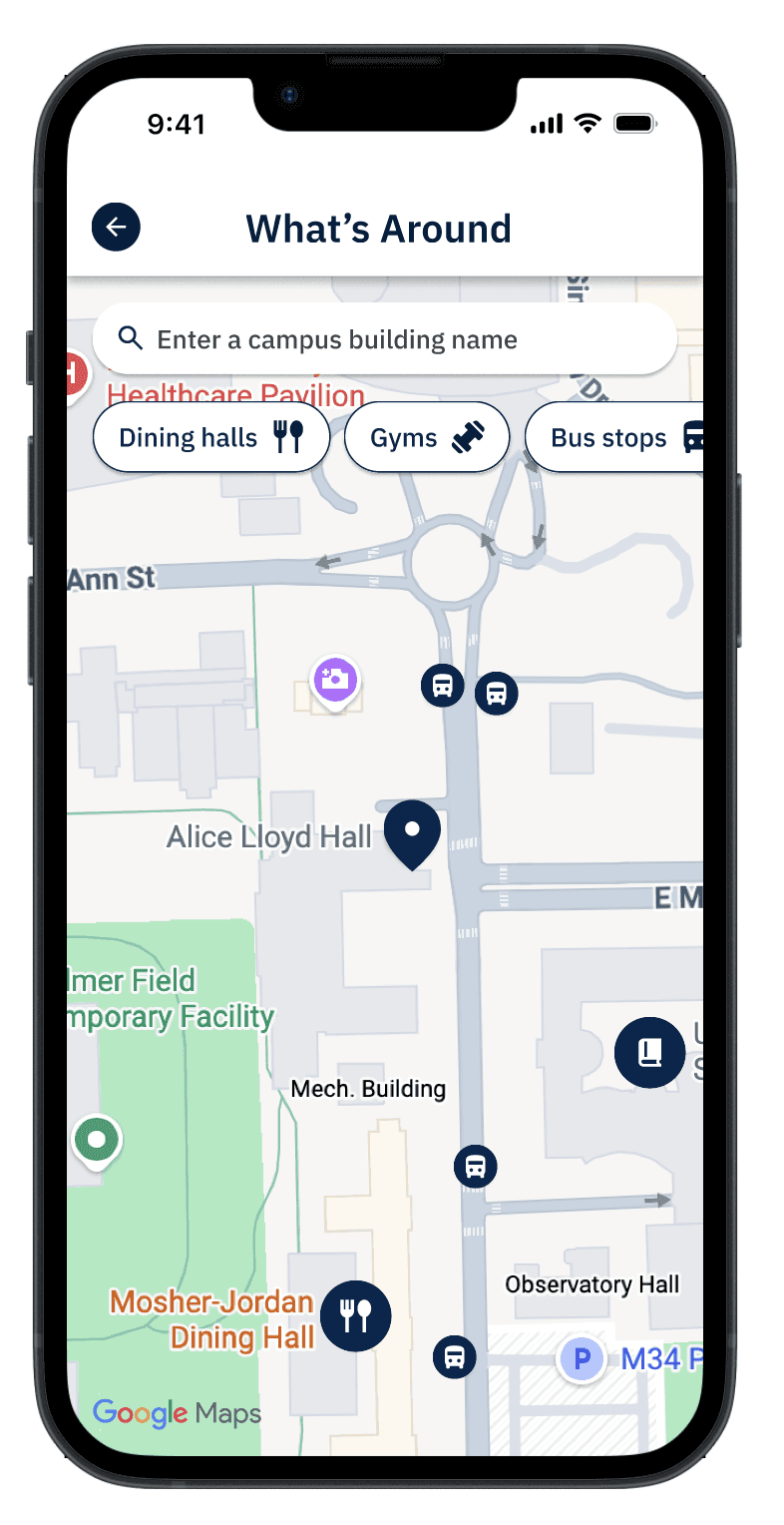
Desire for more functionality out of dorm maps → Allowed users to explore nearby campus buildings and see dorm-to-building distance estimates, following map conventions like location filters, search bars, and pinch-to-zoom gesture.
Diverse preferences for contacting roommates outside of in-app messaging → Allowed users to share multiple third-party contact methods (email, phone number, Instagram, etc.) with their roommate.
Desire for more functionality out of dorm maps → Allowed users to explore nearby campus buildings and see dorm-to-building distance estimates, following map conventions like location filters, search bars, and pinch-to-zoom gesture.
Phase 6:
Developer Handoff
Phase 6:
Developer Handoff
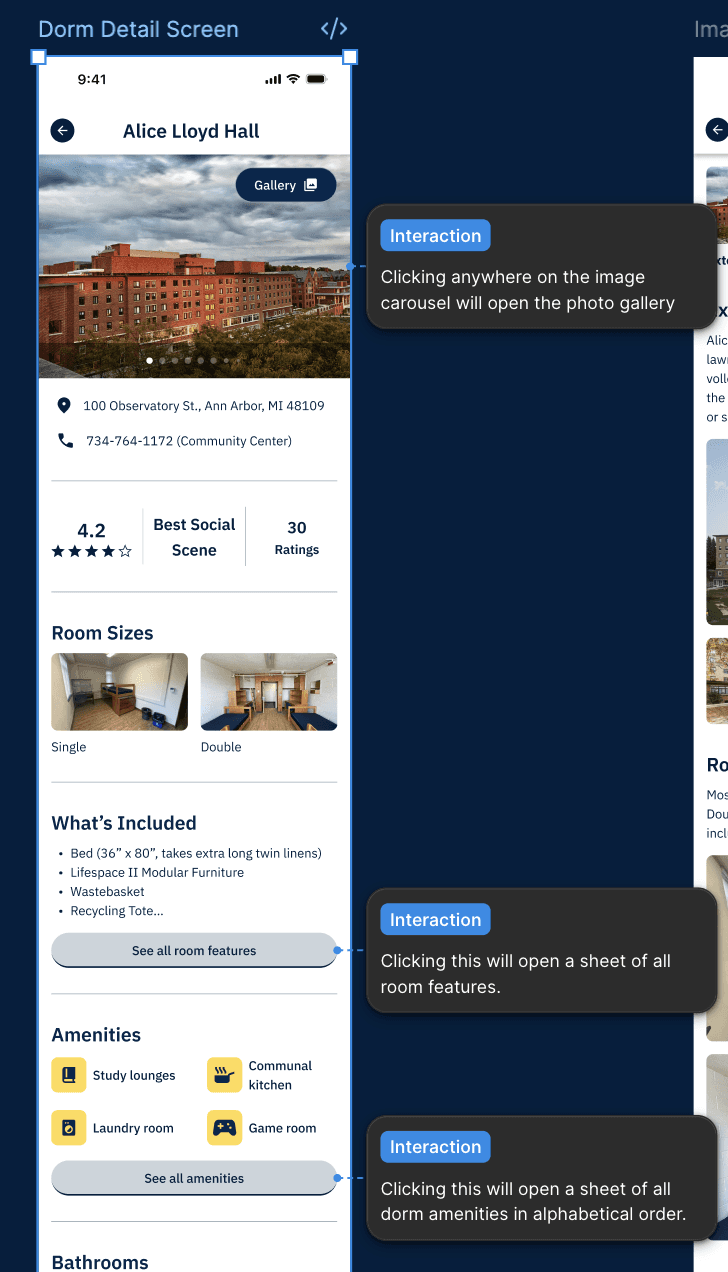
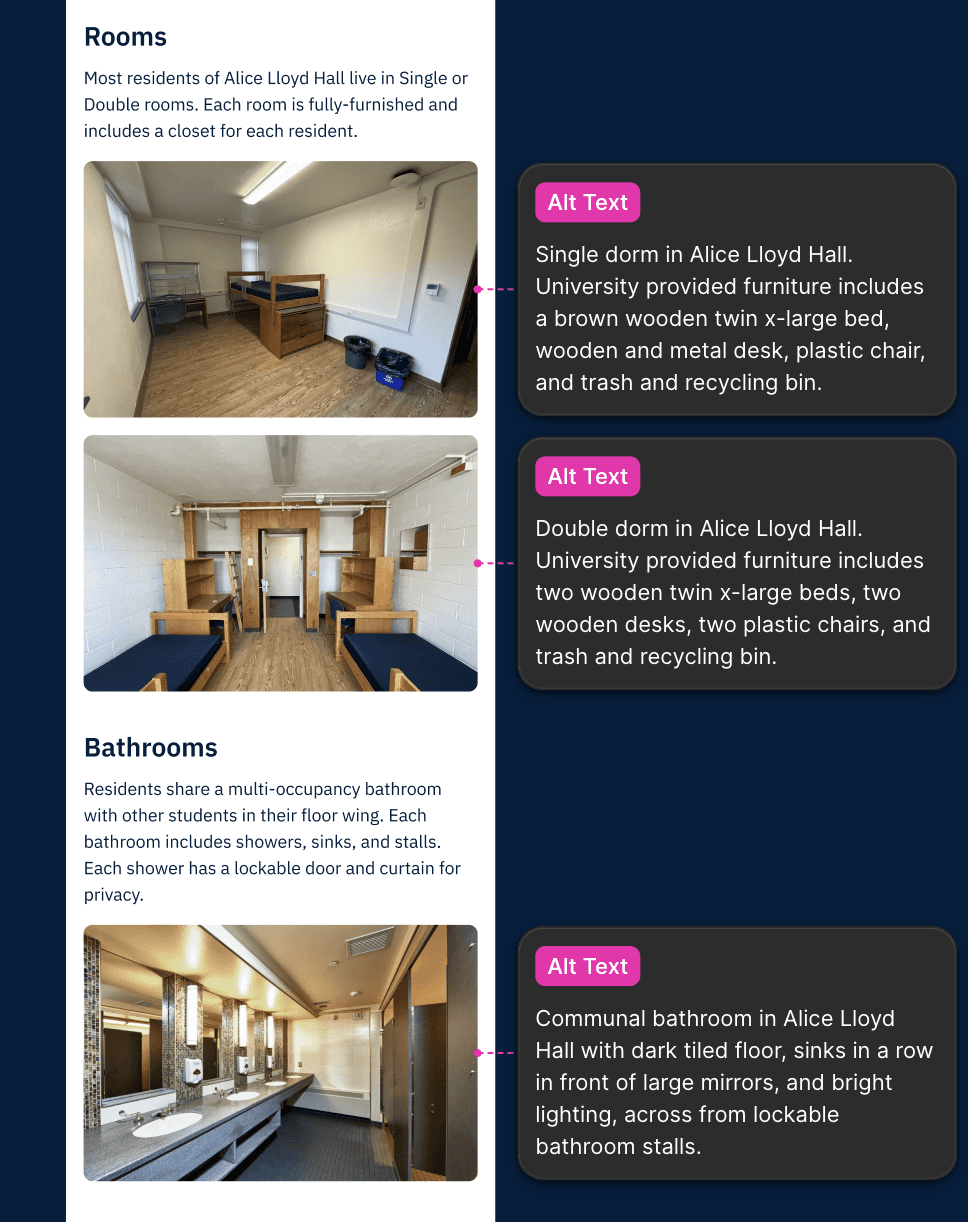
We created a detailed developer handoff that captures both the functionality and the native iOS behavior of MiDorm. We noted our color and typography styles for easy reuse, annotated intended screen content states and component interactions, and documented hardware-integrated features (e.g., when the user’s camera or photo library is triggered).
We created a detailed developer handoff that captures both the functionality and the native iOS behavior of MiDorm. We noted our color and typography styles for easy reuse, annotated intended screen content states and component interactions, and documented hardware-integrated features (e.g., when the user’s camera or photo library is triggered).
Reflections
Reflections
Our Approach
Our Approach
A native app for a common U-M student problem that currently has no university-specific solution. Building within the U-M system required navigating both Apple’s iOS guidelines and the University’s design standards, often making tradeoffs where they conflicted. Despite these constraints, our decisions consistently prioritized user needs and expectations.
A native app for a common U-M student problem that currently has no university-specific solution. Building within the U-M system required navigating both Apple’s iOS guidelines and the University’s design standards, often making tradeoffs where they conflicted. Despite these constraints, our decisions consistently prioritized user needs and expectations.
Our Approach
A native app for a common U-M student problem that currently has no university-specific solution. Building within the U-M system required navigating both Apple’s iOS guidelines and the University’s design standards, often making tradeoffs where they conflicted. Despite these constraints, our decisions consistently prioritized user needs and expectations.
Next Sprint
Next Sprint
In our next sprint, we would enhance visual dorm details by adding student-created video walkthroughs to build transparency and trust. We would also conduct additional user research to identify the most valuable features and guide future updates.
In our next sprint, we would enhance visual dorm details by adding student-created video walkthroughs to build transparency and trust. We would also conduct additional user research to identify the most valuable features and guide future updates.
MiDorm
Dorm Decisions, made easy
This was a team project, part of Advanced Design (SI 407) course at the University of Michigan
Why This Product
As an incoming freshman, choosing where to live can feel overwhelming. Information scattered and no easy way to compare dorms, students often rely on guesswork and word of mouth.
MiDorm simplifies this by organizing key information and creating an easy way to explore and compare options to help students make informed decisions.
Phase 1:
Competitive Review
For each competitor, we examined the clarity of option presentation, the transparency of option information, and personalization.
Key Findings
Cluttered Interfaces Make Dorm Selection Overwhelming
Students struggle to quickly identify dorms that meet their needs due to dense option presentation and limited visibility into dorm information.
No Way to Track or Compare Preferred Dorms
Existing tools do not allow students to save or compare dorms they are considering. This causes students to rely on memory or external tools
Phase 2:
Defining the Product
After conducting this user research, we compiled our findings into a Product Vision Board. This method allowed us to capture the overall app implementation strategy and ensure that our app leveraged the strengths of the University
Target Group
Incoming students @ University of Michigan
Design Goals
Providing detailed visual descriptions of dorms
Personalized filtering/sorting options
Option to prioritize and rank dorms
Phase 3:
Design Process
Ideation Phase
Crazy 8 sketches
Mid-Fi
Key Design Decision
Visual details are the most engaging and useful to students. This led us to adopt a photo-first design for dorm detail screens.
Mobile First +
Desing System
Before designing our high-fidelity designs, we created a design system to streamline our process. We used Apple’s iOS Human Interface Guidelines and library to create key components such as tab bars, toggles, and overlays/sheets, so the experience felt instantly intuitive for Apple users.
Phase 4:
Initial Hi-Fidelity
Keeping our research findings and mobile-first considerations in mind, we progressed our major app screens from sketches to high-fidelity prototyped wireframes.
Product Detail Page
Product Detail Page
Key Design Decision- Photo Gallery (Product Detail Page)
Increasing visual transparency by placing a photo gallery at the top of each dorm page, featuring student-submitted images of real rooms and spaces help students make more informed decisions.
Phase 5:
User Testing Insights
We conducted 5 moderated usability tests with current undergraduate U-M students who have lived in a campus dorm as it aligned with our target demographic.
Our main tasks tested included: using filters to identify dorms matching specific criteria, learning more about a specific dorm, and reorganizing a dorm ranking.
Success
We found that our design performed as intended. All five participants were able to complete the key tasks with ease and they appreciated the level of transparency and detail provided in the dorm information.
" The filters are really easy to scroll through" - Diya Sankla ( Senior @ Umich)
" I really appreciated pictures of the dorms because I didn't have that when initially going through the process"- Reeva Bohra ( Junior @ Umich)
Pain Points
Users expected more interactive functionality from the dorm map on the dorm detail screen.
Three out of five participants expected a visible “Done” or “Search” button and did not recognize the iOS up-arrow as the action to apply filters.
Users did not recognize the photo gallery as interactive and were unaware they could tap to view more images.
Revision
Diverse preferences for contacting roommates outside of in-app messaging → Allowed users to share multiple third-party contact methods (email, phone number, Instagram, etc.) with their roommate.
Desire for more functionality out of dorm maps → Allowed users to explore nearby campus buildings and see dorm-to-building distance estimates, following map conventions like location filters, search bars, and pinch-to-zoom gesture.
Phase 6:
Developer Handoff
We created a detailed developer handoff that captures both the functionality and the native iOS behavior of MiDorm. We noted our color and typography styles for easy reuse, annotated intended screen content states and component interactions, and documented hardware-integrated features (e.g., when the user’s camera or photo library is triggered).
Reflections
Our Approach
A native app for a common U-M student problem that currently has no university-specific solution. Building within the U-M system required navigating both Apple’s iOS guidelines and the University’s design standards, often making tradeoffs where they conflicted. Despite these constraints, our decisions consistently prioritized user needs and expectations.
Our Approach
A native app for a common U-M student problem that currently has no university-specific solution. Building within the U-M system required navigating both Apple’s iOS guidelines and the University’s design standards, often making tradeoffs where they conflicted. Despite these constraints, our decisions consistently prioritized user needs and expectations.
Next Sprint
In our next sprint, we would enhance visual dorm details by adding student-created video walkthroughs to build transparency and trust. We would also conduct additional user research to identify the most valuable features and guide future updates.